A PDF menu behind a QR code is not a digital menu
Many UAE restaurants went "digital" by saving the printed menu as a PDF and printing a QR code that opens it. It works, sort of. But for your guests it is still a paper menu, only smaller, and for you it still costs a reprint every time something changes.
What a PDF menu really is
A PDF is a picture of a page. It was made for printing on A4 or A3, not for a phone screen that is about 7 cm wide. When a guest scans your QR code and the PDF opens, this is what happens:
- They pinch and zoom. The text is sized for paper, so on a phone it is too small to read. Guests zoom in, lose their place, zoom out and zoom in again.
- They wait. Menus with photos are often 5 to 20 MB. On a busy terrace or a weak signal, the guest stares at a blank screen while the file downloads.
- They scroll through everything. There is no way to jump to Drinks, search for "shawarma" or hide the dishes with nuts. Page 1 to page 12, every time.
- They read one language at a time. A bilingual PDF usually means English and Arabic squeezed side by side, or two separate files.
A PDF puts your paper menu on a phone. A digital menu is built for the phone.
The real cost is on your side
The bigger problem is not the guest. It is what happens every time your menu changes.
- A price goes up. You open the design file (if you still have it), change the price, export a new PDF and upload it. If the designer has the file, you wait for them.
- A dish sells out. The PDF still shows it. The waiter explains, again, at every table.
- You want to push today's special. There is nowhere to put it, so it goes on a chalkboard or a printed insert.
- You run a breakfast menu and a dinner menu. That is two PDFs and two QR codes, or one long PDF guests scroll past.
- You want to know what guests look at. A PDF cannot tell you. You have no idea which dishes get attention and which are never seen.
So the menu still behaves like print: slow to change, the same for everyone, and silent about what is working.
What "going digital" should mean
A real digital menu is a small web page made for phones. It opens in the browser with no app. The content (dishes, prices, photos, languages) lives in a system you can edit, not in a file. That one difference changes everything:
| PDF behind a QR code | Digital menu | |
|---|---|---|
| Reading on a phone | Pinch and zoom | Text sized for the phone |
| Finding a dish | Scroll every page | Category tabs, search, filters |
| Changing a price | Redesign, export, upload | Type the new price, done |
| Sold out | Still on the menu | Marked sold out in one tap |
| Specials and offers | Chalkboard or insert | Highlighted at the top |
| Breakfast / dinner | Separate files | Switches by time of day |
| Arabic | Squeezed in, or a second file | Guest taps EN or عربي |
| Allergens | Small print, if at all | Filter: no nuts, no gluten |
| What guests look at | Unknown | Scans and dish views per table |
| Ordering | Not possible | Possible, if you want it |
Signs your restaurant is still on "PDF digital"
- A guest has ever asked a waiter "can you just bring the paper menu?"
- Your prices online and on the table do not match.
- Changing the menu means messaging a designer.
- Your QR code opens a Google Drive or Dropbox link.
- You do not know your most-viewed dish.
One "yes" is enough to show the menu is digital in name only.
Moving from PDF to a real digital menu
The good news: your PDF is the perfect starting point. It already has every dish, description and price. Tools like WOW Table read the PDF for you and turn it into a menu built for the phone, in English and Arabic, usually in a couple of minutes. You check it, add or fix anything, and print new QR codes for the tables. After that you never touch a design file to change a price again.
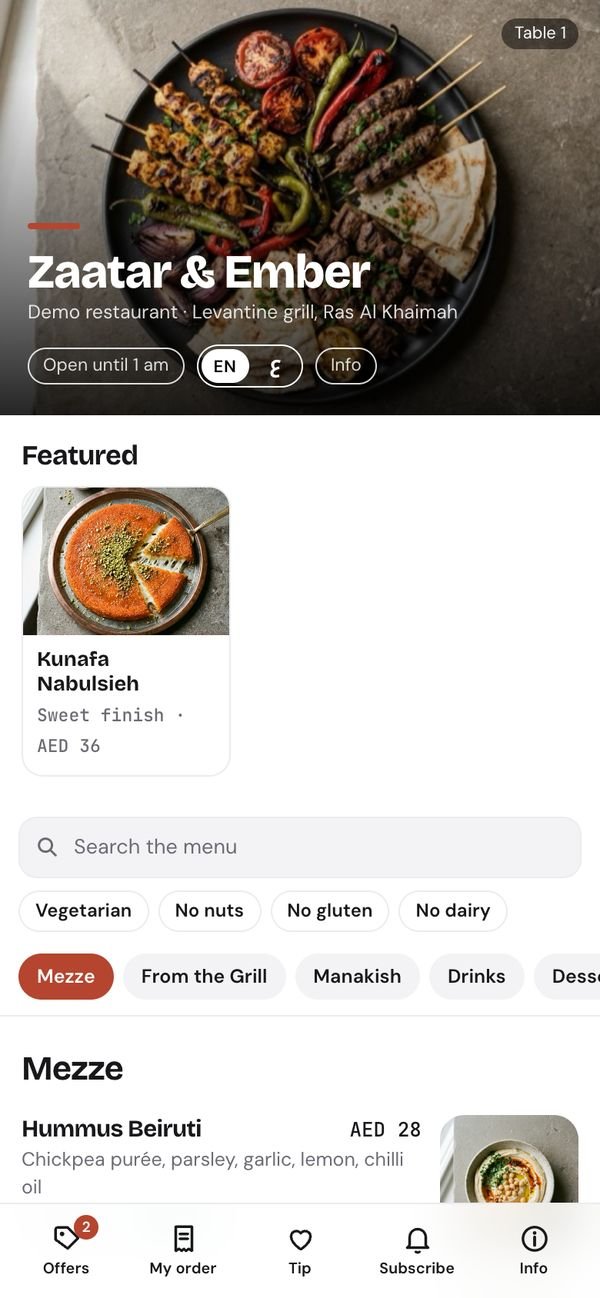
If you want to see your own menu this way before deciding anything, upload your PDF here. It is free, it needs no account, and you will see the result on your phone.
Questions
Is a PDF menu with a QR code a digital menu?
Technically it is on a screen, but it behaves like paper: guests zoom to read it, and you redesign and re-upload it for every change. A digital menu is a phone web page you edit directly, with tabs, search, filters, offers and languages.
Do guests need an app for a digital menu?
No. A good digital menu opens in the phone browser straight from the camera, on any iPhone or Android.
Can I keep my PDF menu design?
Your PDF is the best starting point: WOW Table reads it to build the menu, including dish photos when the PDF has them. The phone version uses a design made for small screens, in your colours.
How long does it take to switch from a PDF menu?
With WOW Table, reading a PDF menu usually takes about two minutes. Checking it and printing the table QR codes can be done the same day.